HL7 v2 to FHIR, Two Ways: The Integration Engine and the Code Underneath
Walk into any hospital and you’ll find software from four different decades trying to talk to each other. The lab system speaks one dialect, the EHR another, the billing system a third. For thirty-five years the thing holding it all together has been HL7 v2, a text-based messaging format from 1988 that, as of 2026, is still used by around 95% of US healthcare organizations. The newer world is FHIR: a modern, JSON-over-HTTP standard that regulators have pushed hard, and adoption has caught up fast - roughly 78% of US hospitals now expose FHIR APIs too. The catch is that most run both at once, which is exactly why so much healthcare integration work today is getting messages across that gap, from v2 to FHIR.
This post explains that translation from the ground up. I’m assuming you’ve never touched HL7 or FHIR, so I’ll build the ideas one at a time: what an HL7 v2 message is, how it travels, how it maps onto FHIR, and the handful of places where the two standards genuinely disagree. To keep it concrete, I built the same bridge twice - once with the integration engine the industry actually runs, and once from scratch in TypeScript - and we’ll look at both.
Full disclosureI built this with Claude as a pair-programmer. The code is real and tested, and the goal here is to explain how it works clearly enough that you could follow it or rebuild it yourself. Where I simplified, I say so.
Why This Even Needs to Exist: A Short History
A little history makes the rest of the post make sense. HL7 - Health Level Seven, named after the seventh (application) layer of the classic OSI networking model - is a healthcare standards organization founded in 1987. Its 1988 standard, HL7 v2, spread across hospitals worldwide and never left.
The trouble with v2 is that it’s almost too flexible. Most fields are optional, and every hospital fills them in a little differently. There’s a well-worn saying in this field: “if you’ve seen one HL7 interface, you’ve seen one HL7 interface.” On top of that, v2 lets any site invent its own custom segments (called Z-segments), so interfaces end up shaped around whoever is sending them. That flexibility made v2 easy to adopt and hard to standardize.
HL7’s first attempt to fix this was v3, in the 2000s. It went in the opposite direction and constrained almost everything using a formal information model (the RIM). It was rigorous but complex, heavily XML-based, and hard to learn - and it never saw wide adoption. (It didn’t help that HL7’s specifications sat behind paid membership at the time.)
The breakthrough came from Grahame Grieve, an Australian standards expert now widely regarded as the “father of FHIR.” In 2011 he wrote the first draft of a new approach, which he called Resources for Health. HL7 adopted it later that year and gave it the name it carries today: FHIR, Fast Healthcare Interoperability Resources. The first official release arrived in 2014. Two ideas made it work where v3 hadn’t. First, resources: instead of one giant model, healthcare data is broken into small, self-contained pieces - Patient, Encounter, Observation, Condition - that reference each other. Second, the web: FHIR is a plain REST API that speaks JSON, using the same tools web developers already know. Grieve also pushed to keep FHIR freely available, which lowered the barrier that had hurt v3.
That leaves us where we are now. Most systems still emit v2. New applications - and, increasingly, US regulation like the 21st Century Cures Act and CMS interoperability rules, all built on FHIR R4 and its US Core profiles - expect FHIR. Nobody is ripping out the old systems, so you put a bridge in the middle that translates v2 into FHIR as messages flow. That bridge is what this post is about.
What an HL7 v2 Message Actually Looks Like
Everything starts with being able to read the source. Here’s a complete HL7 v2 message - an ADT^A01, which is a patient admission (ADT stands for Admit/Discharge/Transfer, and A01 is the specific “admit” event):
MSH|^~\&|EPIC|ST_MARYS|FHIRBRIDGE|SYMBOL|20260628093000||ADT^A01|MSG00001|P|2.5.1
EVN|A01|20260628093000
PID|1||MRN123456^^^ST_MARYS^MR||DOE^JANE^MARIE||19850312|F|||123 MAIN ST^^SPRINGFIELD^IL^62704^USA
PV1|1|I|WEST^301^A||||DRJONES^JONES^GREGORY^A^^^MD|||MED|...|20260628093000
It looks cryptic, but the grammar is small and consistent. Each line is a segment, named by the three-letter code at its start. Within a line, the characters are separators, and they nest:
|separates fields (the top-level pieces of a segment)^separates components (parts of a single field)~separates repetitions (when one field holds a list)&separates sub-components (parts of a component)
Fields are numbered starting at 1, and you refer to them as SEG-N - so PID-5 is the fifth field of the PID segment. With that key, the message above reads cleanly:
- MSH (Message Header) is the envelope: who sent it (
EPICatST_MARYS), when, and what kind of message it is.MSH-9=ADT^A01is the field that tells the receiver how to handle everything else. - PID (Patient Identification) is the patient:
PID-3is the medical record number,PID-5the name (DOE^JANE^MARIE= family / given / middle),PID-7the birth date,PID-8the sex. - PV1 (Patient Visit) is the encounter:
PV1-2is the patient class (I = Inpatient),PV1-3the assigned location,PV1-44the admit time.
You don’t need to memorize any of these field numbers. Whenever you hit a segment or field this post doesn’t cover, Caristix HL7-Definition is a free reference that documents every segment, field, and data type in the standard - a good tab to keep open while you decode a message.
A lab result message (ORU^R01) uses the same grammar with different segments - an OBR for the ordered panel and one OBX per individual result. That’s the whole format. The bridge’s job is to take this flat, positional text and turn it into linked FHIR resources.
MLLP: How the Message Arrives
Before we can convert anything, one practical question: how does a v2 message physically get from a lab system to a receiver? The answer is a small protocol called MLLP (Minimal Lower Layer Protocol). HL7 v2 travels over plain TCP, and TCP is just a continuous stream of bytes - it has no idea where one message ends and the next begins. MLLP solves that by wrapping every message in three marker bytes:
<VT>  ...the entire HL7 message...  <FS><CR>
0x0B                                0x1C 0x0D
A start byte (VT), an end byte (FS), and a carriage return (CR). Those specific bytes never appear inside a normal HL7 message, so the receiver can reliably find where each message begins and ends, pull it out of the stream, process it, and send back a short acknowledgement. MLLP does nothing else - there’s no encryption and no guarantee the message actually arrives. That last point (no delivery guarantee) comes back when we talk about production.
The Bridge, Two Ways
The job is the same no matter how you build it: receive v2 over MLLP, map it to FHIR, and POST the result to a FHIR server. I built that middle box in two completely different ways so we can compare them.
HL7 v2 → FHIR R4 · one bridge, two implementations
Stage 1 is the way this is normally done in industry: a channel inside an integration engine. I used Open Integration Engine (OIE), the open-source fork of the popular Mirth Connect. Stage 2 is the same mapping written by hand in TypeScript, so we can see every step the engine normally hides.
Stage 1: The Engine Way
An integration engine lets you build an interface without writing a program. In OIE you create a channel made of three parts: a source that listens for incoming MLLP messages, a transformer that does the mapping, and a destination that sends the result somewhere - in our case, an HTTP POST to a FHIR server. You configure each part in a GUI and click deploy. There’s no code to ship and no server to run yourself.
One practical heads-up if you try OIE: its admin console isn’t a web page, it’s a desktop Java application launched through Java Web Start - a technology modern macOS no longer wants to run. Getting it to open took some fiddling with a third-party launcher (OpenWebStart). Worth knowing before you start.
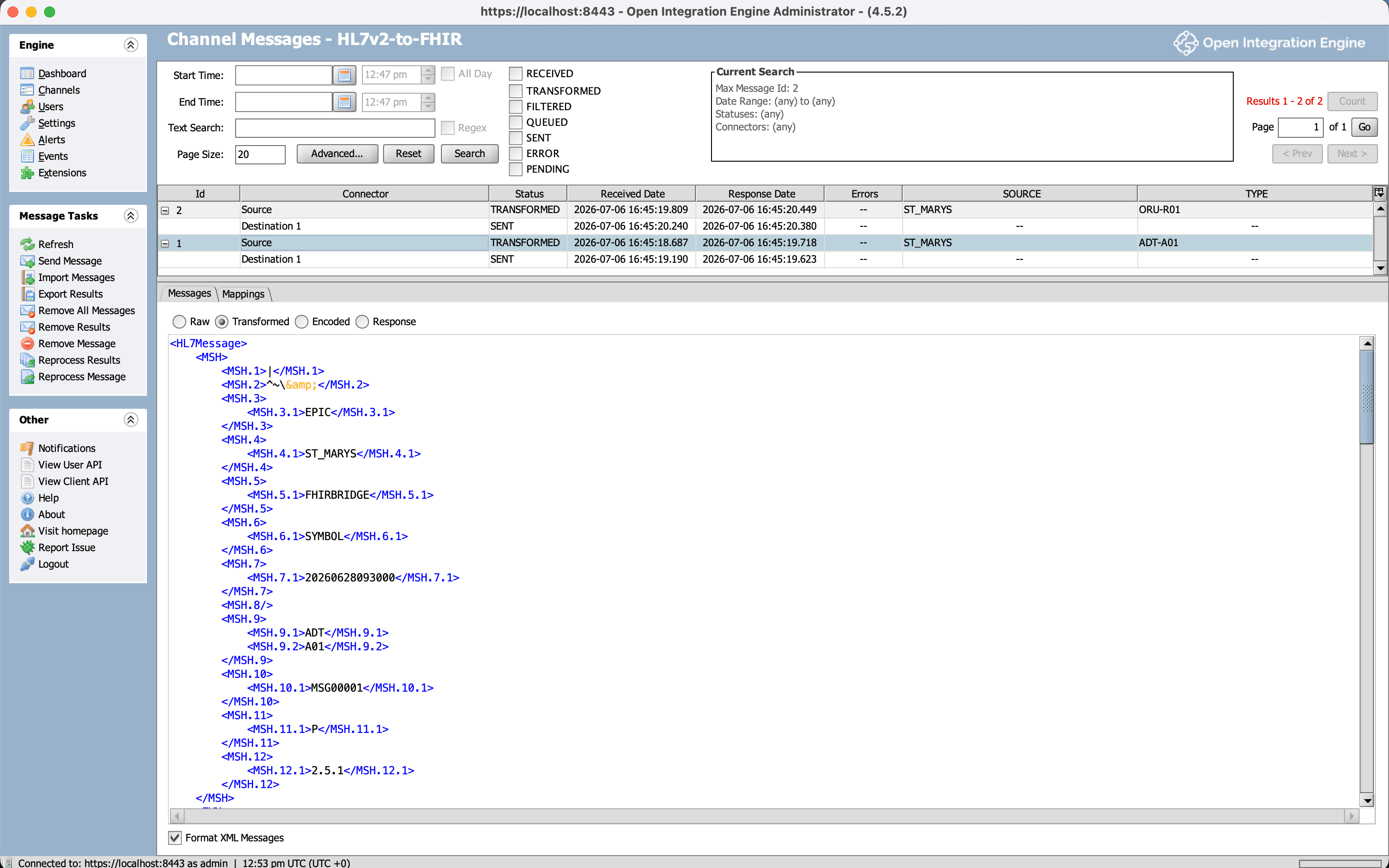
Here’s the part that’s genuinely instructive. When you tell OIE the input is HL7 v2.x, it doesn’t hand your transformer the raw pipe-delimited text. It first parses the message into an XML tree, and your transformer works against that tree using a language feature called E4X (an old JavaScript extension that lets you walk XML as if it were nested objects). Reading the MRN, for example, looks like this:
// Inside the OIE transformer - msg is an XML tree, navigated with E4X
var mrn = msg['PID']['PID.3']['PID.3.1'].toString();  // "MRN123456"
The engine stores the message at every stage, which makes it a great teaching tool: you can see the exact same admission in three forms. First, the raw v2 that arrived over MLLP:
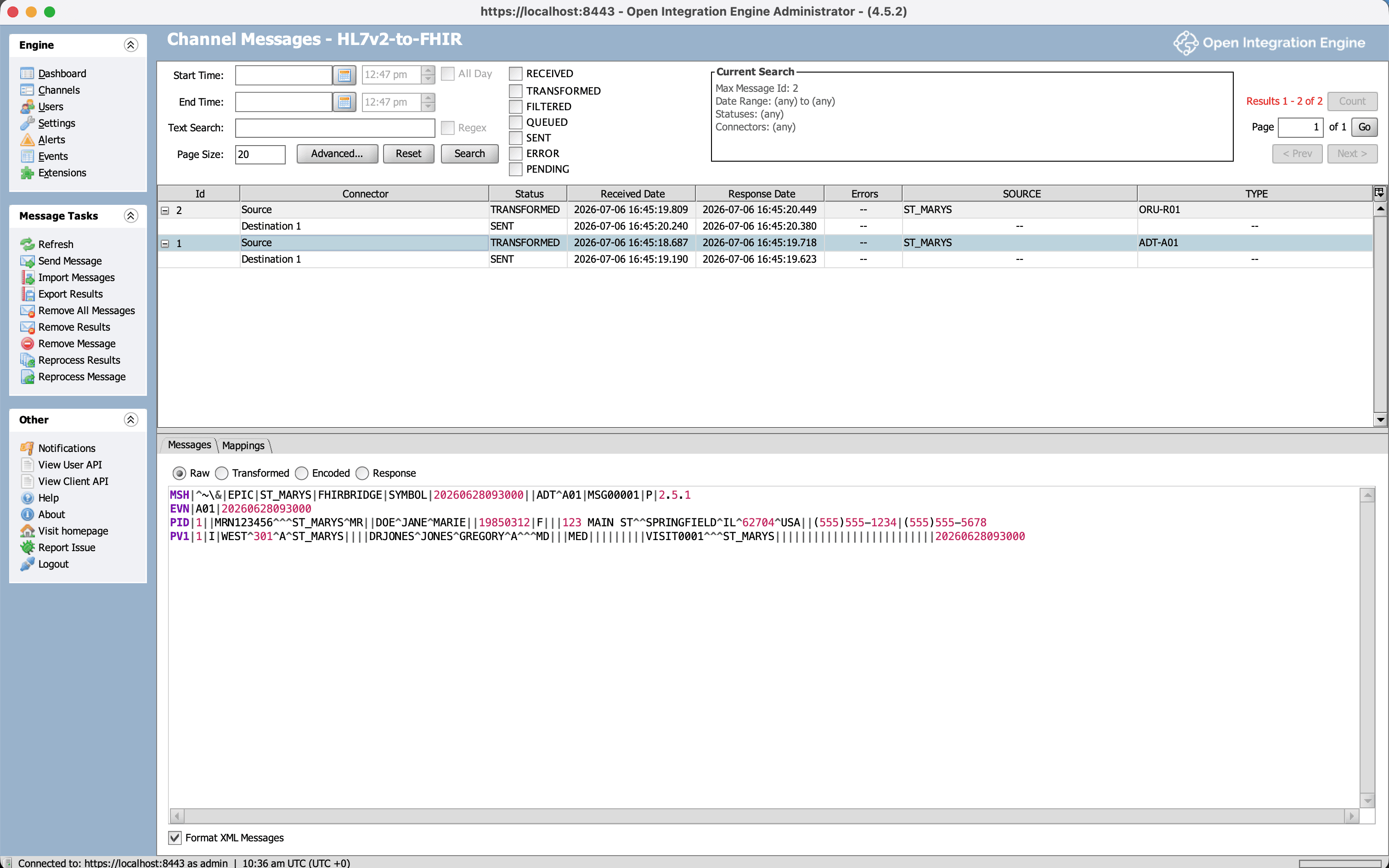
Second, the same message after OIE parses it into an XML tree. This is the msg that the transformer navigates - every field and component becomes a nested XML element, which is why msg['PID']['PID.3']['PID.3.1'] works:
And third, the FHIR Bundle the transformer produces and sends on to the FHIR server:
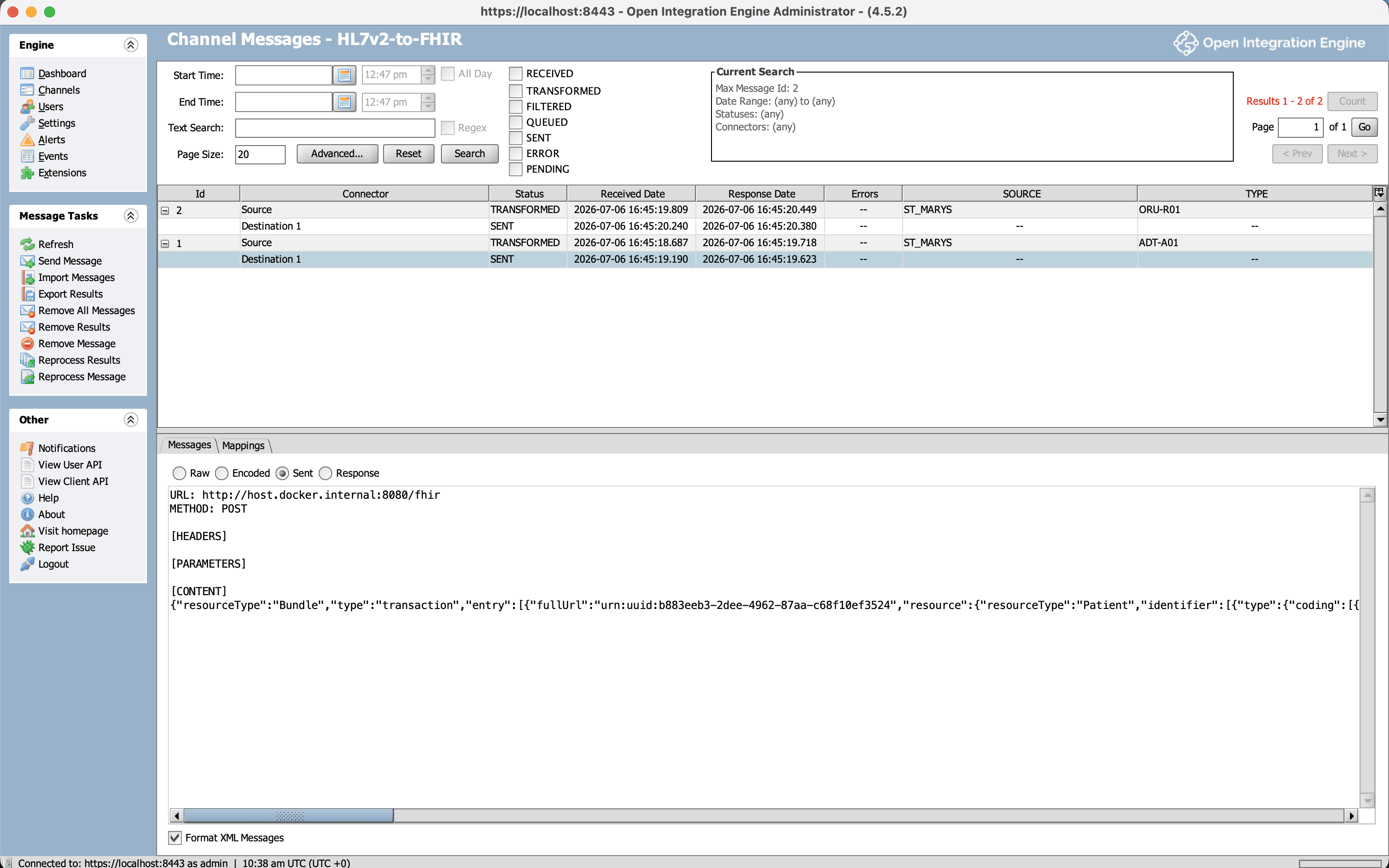
Three representations of one patient admission - pipes, then XML, then FHIR JSON. Deploy the channel, send a few messages to the MLLP port, and the dashboard confirms the whole pipeline ran: messages received, transformed, and delivered, with zero errors.
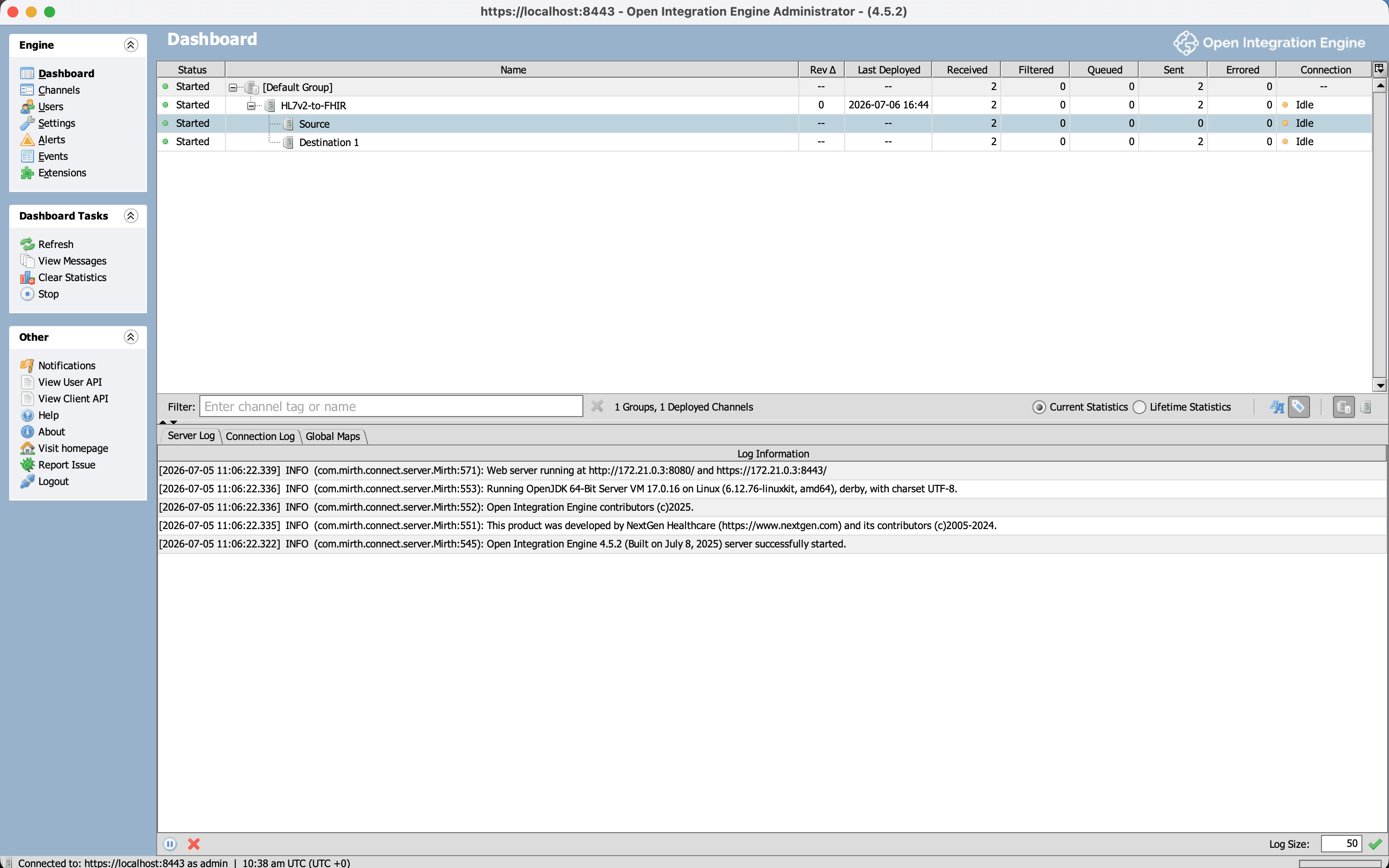
And these aren’t placeholder resources - they really exist in the FHIR server, and you can query them back:
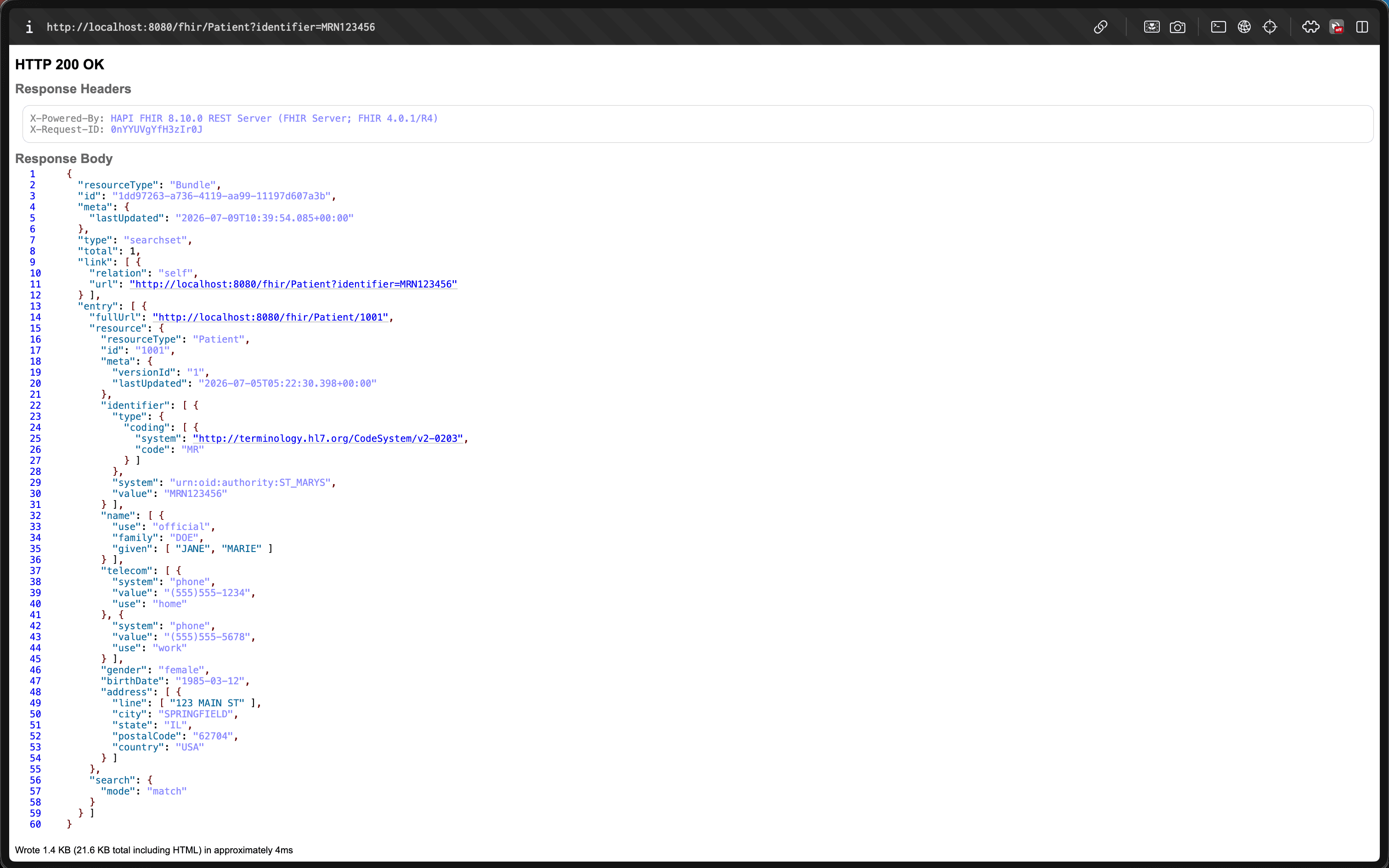
For running a real hospital interface, this is the right tool, and you’d stop here. Engines give you a lot of production machinery for free, which we’ll get to. But everything interesting about the translation happens inside that transformer, hidden behind the GUI. To actually see it, I rebuilt the same thing in plain code.
Stage 2: The Code Underneath
The second version is a small TypeScript program that does exactly what the engine did, but in the open. It has four parts:
- a parser that turns the raw message text into a structured object you can read
- a set of mappers that build FHIR resources from that object
- an MLLP listener so it can receive messages the same way the engine does
- a small client that POSTs the finished FHIR to the server
The parser is where the interesting lesson lives. The plan sounds trivial: split the message into lines to get the segments, then split each line on the | character to get that segment’s fields. And that works for every segment but one.
The exception is MSH, the header - the most important segment in the message. In MSH, the very first field, MSH-1, is the | character itself. It isn’t a value sitting between two separators; it defines what the separator is. So if you split MSH on | like every other segment, everything shifts by one position - the field you think is MSH-9 is actually MSH-8, and so on down the line. The nasty part is that nothing errors out; the message parses fine, you just silently read the wrong fields. It’s the most common mistake people make writing a v2 parser by hand. The fix is to detect MSH and manually put the separator back as field 1:
function toSegment(line, d) {
  const name = line.slice(0, 3);
  const raw = line.split(d.field);
  if (name === "MSH") {
    // MSH-1 IS the separator - re-insert it so fields[n] === MSH-n
    return { name, fields: [name, d.field, ...raw.slice(1)] };
  }
  return { name, fields: raw };
}
Reading it line by line: line.slice(0, 3) grabs the three-letter segment name. line.split(d.field) splits the rest into fields on the delimiter - d.field is the | character (the parser reads the actual delimiters out of the MSH header, since a message is technically allowed to declare different ones). For MSH we rebuild the array so the separator sits at index 1, which realigns everything so fields[9] really is MSH-9. Every other segment is left as-is.
Once the parser produces this structure, reading a value is the plain-code version of the engine’s E4X. Where OIE wrote msg['PID']['PID.3']['PID.3.1'], the TypeScript is comp(pid, 3, 1, d) - read from the PID segment, field 3, component 1, which is the MRN, "MRN123456". Same field, no XML.
From there, the mappers do the actual translation. Each one knows how to turn a segment into a FHIR resource: PID becomes a Patient, PV1 becomes an Encounter, each OBX becomes an Observation, and OBR becomes a DiagnosticReport that ties the observations together. All of those resources get packaged into a single FHIR transaction Bundle - one request that asks the server to create everything at once - and that’s what gets POSTed. It’s the same Bundle the OIE transformer was assembling; the only difference is that here every step is visible.
The Hard Parts (Where the Learning Actually Is)
Most of the mapping is mechanical - copy this field into that resource. A few spots are genuinely tricky, though, and they trip you up the same way whether you’re clicking through the engine or writing code. The four below are the ones that took real work to get right.
1. Required Fields, and the 422 That Teaches Them
FHIR marks certain fields as mandatory. On the resources we’re building, Encounter.status, Observation.status, and DiagnosticReport.status are all required - in the spec they’re marked 1..1, meaning exactly one, non-optional. Leave any of them out and the FHIR server rejects the entire Bundle with an HTTP 422 error.
The awkward one is Encounter.status, because v2 has no field that carries it. The reason is a genuine difference in how the two standards think. HL7 v2 describes what happened - the message’s trigger event is “A01: the patient was admitted.” FHIR describes the current state - an Encounter is “in-progress,” or “finished,” or “cancelled.” So the bridge has to infer the state from the event:
// Encounter.status has no v2 source - derive it from the ADT trigger event
function encounterStatus(trigger) {
  switch (trigger) {
    case "A03": return "finished";    // discharge
    case "A11": return "cancelled";   // cancel admit
    default:    return "in-progress"; // A01 admit, A08 update, ...
  }
}
This event-versus-state gap is a recurring theme in v2-to-FHIR work. The two standards don’t just format data differently; they model it differently. A required field with no direct source is the simplest example, but the same pattern shows up again below.
2. Idempotency: The HTTP 412 and Conditional Create
My first version created every resource with a plain POST. That worked when I sent a message once. When I re-sent the same admission to test it, the server returned a different error:
HTTP 412
HAPI-2840: Can not create resource duplicating existing
resource: Patient/137048918
This is why FHIR has conditional create. “Conditional” means the server does a lookup on your behalf before creating anything: you attach a search query, and the server only creates the resource if nothing already matches it. Instead of a plain POST, you key the create on the patient’s identifier using an ifNoneExist instruction:
{
  "request": {
    "method": "POST",
    "url": "Patient",
    "ifNoneExist": "identifier=urn:oid:1.2.840.114398.1.34|MRN0098765"
  }
}
This matters because a real interface is never the only thing writing to that server, and the same message often arrives more than once - a network retry, a corrected re-send, two upstream systems both forwarding the same admit. Without conditional create, every repeat makes a brand-new duplicate patient. With it, the repeats are harmless: the server finds the existing record and leaves it alone.
3. When One v2 Field Becomes a REST Verb: DG1 Action Codes
The mapping that took the most thought was diagnoses. A DG1 segment (a diagnosis) maps to a FHIR Condition, which is straightforward - until you reach DG1-21, the action code. Its value is A (add), U (update), or D (delete), and it doesn’t describe the diagnosis at all. It tells the receiver what to do with it. In FHIR terms, that isn’t data - it’s the HTTP method of the request:
const action = value(dg1, 21, d);            // "A" | "U" | "D"
const query = `identifier=${system}|${value}`; // from DG1-20

if (action === "D") {                        // DELETE Condition?identifier=...
  entries.push({ request: { method: "DELETE", url: `Condition?${query}` } });
} else if (action === "U") {                  // conditional PUT (update)
  entries.push({ resource, request: { method: "PUT", url: `Condition?${query}` } });
} else {                                      // A / empty → create
  entries.push({ resource, ifNoneExist: query });
}
This is the part where DG1-20 (the diagnosis identifier) becomes essential: to update or delete a specific diagnosis, the server needs a stable ID to find it by, and that ID goes into the Condition?identifier=... query. It’s the same event-versus-state theme from part 1, one level up - a piece of v2 that has no matching FHIR field, because it’s an instruction rather than a value, and instructions become REST calls.
There’s a subtle bug that’s easy to write here, and my first version had it: a delete with no identifier has nothing to target, and the code let it fall through to a create instead - quietly doing the opposite of what the message asked, which is exactly the kind of failure you never want in something that writes to a medical record. There’s a test guarding against it now.
Try it yourselfThe live converter runs this exact code. Load the ADT+DG1 sample and watch the hyperlipidemia diagnosis come out as a PUT (an update) rather than a create, because its action code is U. It’s a scoped demo, not a full converter - it only maps the message types this project covers.
4. Identity: Making Identifiers Globally Unique
The last tricky part is identity. FHIR expects Identifier.system to be a globally-unique URI, so that system plus value together point to exactly one record anywhere in the world. v2 usually carries this as an “assigning authority” with an official registered number (an OID) attached, so STMARYS&1.2.840.114398.1.34&ISO becomes the URI urn:oid:1.2.840.114398.1.34.
But many feeds only give you a local name like LAB with no registered number behind it. In that case there simply is no globally-unique URI available. The tempting move is to invent an official-looking one - and you shouldn’t. A made-up system is worse than none, because now two different hospitals that both call their space LAB can collide and their patients can get mixed together. The safe options are to use a clearly-local placeholder URI, or to leave system off entirely and be honest that the identifier is only unique within one source.
From Demo to Production
It’s worth being clear about what this project is and isn’t. What I built is production-shaped - it does the right thing in the areas it covers - but it is not a production interface engine, and it wasn’t meant to be. The gap isn’t really the mapping; it’s everything around it:
- Reliability. A real engine can queue messages, retry failed deliveries, hold onto messages if it restarts, set aside ones that keep failing, keep them in order, and slow down when the receiver is overwhelmed. My TypeScript listener does none of that - if it crashes mid-message, the message is gone. This is the biggest reason production uses an engine.
- Coverage. I handle two message types and a handful of segments, with deliberate simplifications (I only read the first repetition of a repeating field, assume a single group of results, and hardcode a small set of codes). Real feeds need per-source handling and the full official v2-to-FHIR mapping guide.
- Conformance. I check that the output is valid FHIR R4, but not that it meets US Core - the stricter US profile that regulators actually require, which mandates specific fields, codes, and extensions. That’s a real gap for a US production system, and a big enough job that I left it out of a demo on purpose.
- Terminology. I hardcoded a few code translations. A real system uses a terminology service that knows the full standard code systems (LOINC, SNOMED, and others) and can map between them.
- Security. The MLLP connection here is unencrypted plain text. Anything touching real patient data needs an encrypted channel (TLS) and proper access control.
Throughout, I followed one rule: map what’s clinically meaningful and whatever the target profile requires, and for everything I chose not to map, write it down. Every skipped field is recorded in the code and in a PRODUCTION.md file, so the gaps are visible decisions rather than accidental holes. For a system that writes to a medical record, silently losing data is one of the worst things that can happen, so knowing exactly what you’re leaving out is part of the job.
Wrapping Up
The main idea to take away is that converting HL7 v2 to FHIR is less about reformatting text and more about re-modelling data. You start with a flat sequence of events and end with a connected set of resources, each holding its own state and referencing the others. Most of the effort concentrates in the few places where the two standards genuinely disagree - the required status fields, the event-versus-state gap, the action codes that turn into REST calls, and the identifiers that have to be globally unique.
If you just need a working interface, an integration engine is the right tool; it handles the hard operational parts for you. Building the mapping a second time by hand was about understanding rather than shipping - it makes every one of those decisions explicit instead of leaving them inside the engine.
Everything is open source and tested end to end against a real FHIR server, and the converter runs live in your browser:
- Live demo: the HL7 v2 → FHIR converter. It’s a scoped demo, not a full converter - it maps the message types this project covers (ADT admissions and ORU lab results, including DG1 diagnoses) and returns a clear error for anything else.
- Source: github.com/Symbol-Health/hl7v2-to-fhir-bridge - both stages, the test suite, and a candid
PRODUCTION.mdon what a real bridge adds
We build HL7 v2 and FHIR integrations
This is a project by Symbol Health. We build FHIR pipelines, HL7 v2 interfaces, and integration bridges for clinics and health-tech startups.
If you’re working through legacy v2 feeds and a FHIR requirement, that’s the exact kind of work we do. Happy to talk through the architecture.